To configure your on-boarding templates follow the steps below.
Step 1: Log into the VAIRKKO Platform.
Step 2: Select 'Admin' in the upper-right hand side of the screen.
Step 3: Access the 'HR CLoud' from the Administrative Toolbar
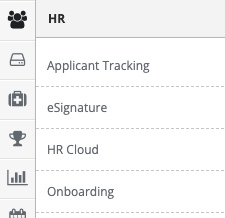
Step 4: Access 'Onboarding' in the in-app menu.

Step 5: Access 'Templates' in the in-app menu.

Step 6: To add a new template select the 'Add Template' tab.

Step 7: Follow the on-screen prompts to configure your template.
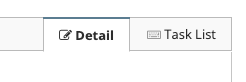
Step 8: To configure the task associated with the template select the 'Task List' tab.
Additional Information
- On-Boarding or Off-Loading templates can have a job description associated with it. Doing this allows you to automatically add this template when adding or disabling an employee.
- All templates can be manually assigned to staff.
- Adding overall stakeholders to a template is optional.
- If a template has a default Stakeholder group they will receive notifications everytime a task is assigned or completed.
- Each individual task can have an owner and that owner will be notified when the template is assigned.
Was this article helpful?
That’s Great!
Thank you for your feedback
Sorry! We couldn't be helpful
Thank you for your feedback
Feedback sent
We appreciate your effort and will try to fix the article