Channels in Chatter allow you to organize conversations and share information with specific groups or teams.
How to Create a Channel
Step 1: Log In
Log into the VAIRKKO platform.
Step 2: Open Chatter
Click the bell icon in the upper left corner to access Chatter.
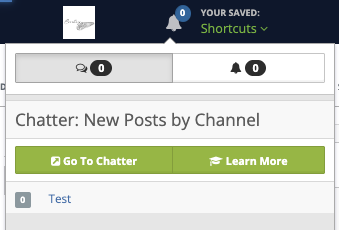
Step 3: Open Channel Settings
Click the gear icon next to Channels.
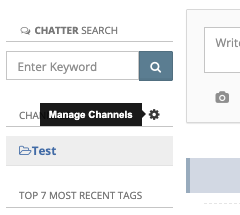
Step 4: Create a New Channel
- Enter your channel name
- Click the “+” button to create it

Additional Information
Channels are a great way to share information and collaborate across your organization.
Examples:
- Sales Department
- Projects
- Training Announcements
Was this article helpful?
That’s Great!
Thank you for your feedback
Sorry! We couldn't be helpful
Thank you for your feedback
Feedback sent
We appreciate your effort and will try to fix the article