The Collision Tracking system within VAIRKKO provides you the ability to enter and track vehicle collisions throughout your organization. These entries allow you to enter valuable information such as weather, road conditions, hours of sleep, and prior workload. This information then can either be stored in the VAIRKKO Platform or printed out and sent to the necessary recipients. To enter a collision incident follow the steps below.
Step 1: Log into the VAIRKKO Platform
Step 2: Access the Administrative area by clicking 'ADMIN' in the upper right-hand corner.
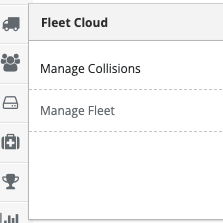
Step 3: Access 'Manage Collisions' from the Administrative Toolbar
Step 4: Select the 'Add New' tab

Step 5: Enter information regarding your collision and then select the add collision data button. Once the initial page is submitted, multiple tabs will appear to collect further data.

Additional Information
- To create, edit, or view collision incidents the employee will need admin access to this feature.
- The group located in the notify upon completion will receive updates when new information is added the incident
Was this article helpful?
That’s Great!
Thank you for your feedback
Sorry! We couldn't be helpful
Thank you for your feedback
Feedback sent
We appreciate your effort and will try to fix the article