To configure your time card settings follow the steps below.
Step 1: Log into the VAIRKKO Platform
Step 2: Access the Administrative area by clicking 'ADMIN' in the upper right-hand corner.
Step 3: Access the 'Schedule Setup' from the Administrative Toolbar
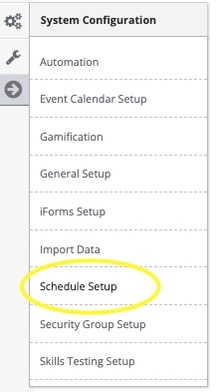
Step 4: 'Time Card' from the in-app menu

Step 5: Follow the on-screen prompts to configure your settings
Time Card Settings
- Employee Punch Approval Required - Do you want employees to approve every time clock punch prior to running payroll? Non-Approved punches will not count towards time card totals
- Employee Signature Required - Do you want your employees to sign their time cards?
- Approver 1&2 Signature Required - Do you want the administrators that approve time cards to sign them? Non-Approved punches will not count towards time card totals
- Managers Can Self Edit - Do want Supervisors and Administrators to be able to make changes to their time cards?
- Allowed to Unlock Time Cards - Who can unlock and lock time cards.
- Groups Allowed to Approve Punches - Which management groups that can approve punches
Was this article helpful?
That’s Great!
Thank you for your feedback
Sorry! We couldn't be helpful
Thank you for your feedback
Feedback sent
We appreciate your effort and will try to fix the article