To configure your Time & Payroll settings continue reading below.
Step 1: Log into the VAIRKKO Platform
Step 2: Access the Administrative area by clicking 'ADMIN' in the upper right-hand corner.
Step 3: Access the 'Schedule Setup' from the Administrative Toolbar
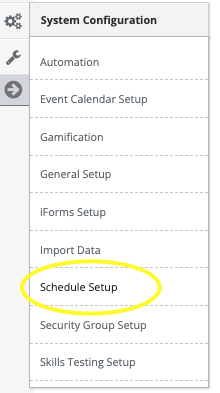
Step 4: 'Payroll' from the in-app menu

Step 5: Follow the on-screen prompts to configure your settings
Setting Options
- Pay Employee By
- Default Punch Code
- Default ILE Code
- Regular Hours Code
- OT Hours Code
- Holiday OT Hours Code
- Excessive Shift Punch Hours
- Payroll Export Format
- Allowed to Export Payroll
- Notify On Missing Punch
- Pay Employees
- Auto Punch in Adjustments
- Auto Punch Out Adjustments
- Auto Punch Back-To-Back Shifts
- Same Pay Period Shift Hours
- Pay Period Duration
- Pay Periods
- Overtime Start Hours
- Holidays
Payroll Export Type
Contact your VAIRKKO support team or VAIRKKO Training to set your payroll export type.