Adding ad-hoc gamification points to an employee profile is a great way to add a few extra points to an employee record without needing the employee to perform/complete tasks that would issue them a gamification badge. This article explains the steps that need to be taken in order to issue ad-hoc gamification points to an employee record.
Step 1:
Log in to your VAIRKKO Platform and select the ADMIN link located in the top right corner. Note; if you do not have this link that means your account does not have administrative rights to perform the following actions and you should contact your VAIRKKO system administrator
Step 2:
Access the HR Cloud / User Management area of the VAIRKKO platform. Note: The menu option may say HR Cloud or User Management depending on the products in which your organization has purchased from VAIRKKO
Step 3:
Locate the employee record you would like to add the ad-hoc gamification points to and click on the blue Actions button next to their name
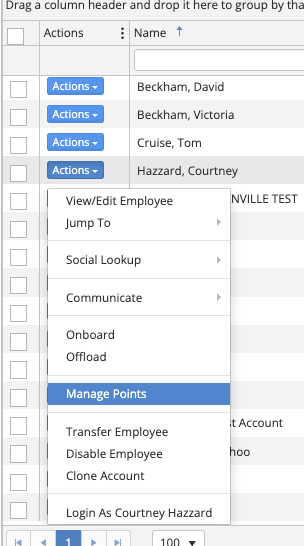
Step 4:
Select ADD, specify how many points you would like to add then save your changes. Note: This tool can also be used to remove gamification points from an employee record by selecting the REMOVE option
Was this article helpful?
That’s Great!
Thank you for your feedback
Sorry! We couldn't be helpful
Thank you for your feedback
Feedback sent
We appreciate your effort and will try to fix the article