To review a Skills Test follow the steps below.
Step 1: Log into the VAIRKKO Platform
Step 2: Access the Administrative area by clicking 'ADMIN' in the upper right-hand corner.
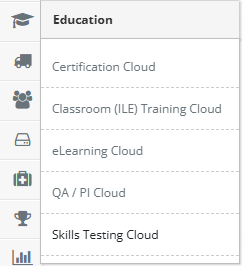
Step 3: Access the 'Skills Testing Cloud' from the Administrative Toolbar
Step 4: Select 'Recorded Skills Test' from the in-app menu

Step 5: Enter filter information to find your recorded skills test
Step 6: From the actions button next to the Recorded Skills Test you can view the test, print the test, or delete the test