Compliance Rule Collections allow you to group multiple compliance rules under one collection and track overall compliance across your agency.
This is especially useful when you need to ensure a specific number of employees meet multiple compliance requirements at once.
What is a Compliance Rule Collection?
A Compliance Rule Collection allows you to:
- Group multiple compliance rules into one collection
- Define how many employees must be compliant for each rule
- Monitor overall compliance across all included rules
How to Create a Compliance Rule Collection
Step 1: Log In
Log into the VAIRKKO platform.
Step 2: Access Admin
Click “Admin” in the upper right-hand corner.
Step 3: Open Certification Cloud
From the Administrative toolbar, select “Certification Cloud.”
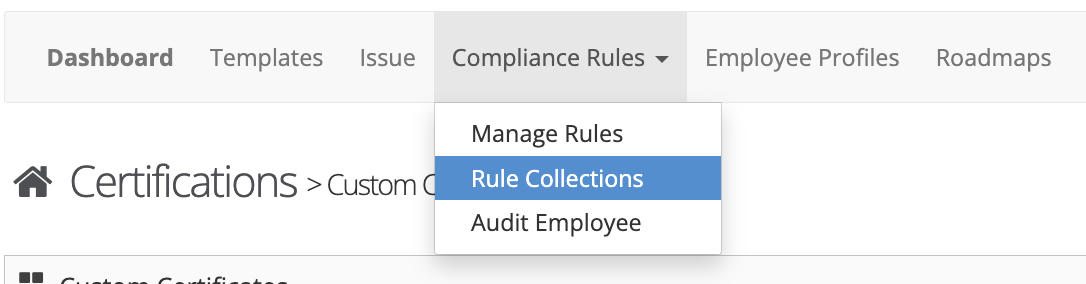
Step 4: Navigate to Rule Collections
From the in-app menu, select:
Compliance Rules → Rule Collections
Step 5: Add a New Collection
Click the “Add New” tab to create a new collection.
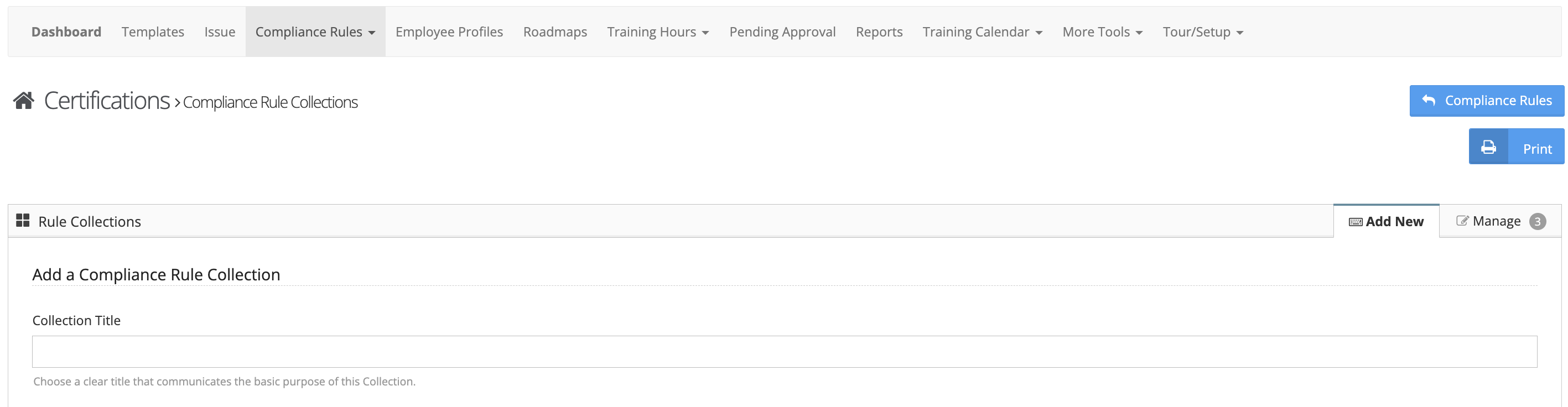
Step 6: Configure Your Collection
Follow the on-screen prompts to:
- Enter a Collection Name
- Select the Compliance Rules to include
- Define the number of employees required for each rule
Example
Collection Name: Cisco Black Rule
Rules Included:
All compliance rules required for your agency to meet Cisco Black standards
Result:
You can view your agency’s overall compliance status for Cisco Black in one place.
Was this article helpful?
That’s Great!
Thank you for your feedback
Sorry! We couldn't be helpful
Thank you for your feedback
Feedback sent
We appreciate your effort and will try to fix the article