To configure your shift bid and give away settings follow the steps below.
Step 1: Log into the VAIRKKO Platform
Step 2: Access the Administrative area by clicking 'ADMIN' in the upper right-hand corner.
Step 3: Access the 'Schedule Setup' from the Administrative Toolbar
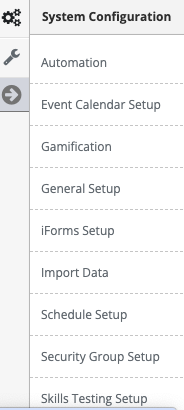
Step 4: 'Shift Bid/Shift Give-Away' from the in-app menu

Step 5: Follow the on-screen prompts to configure the following settings:
- Default Actions for Awarding Bid - Determines if you want bids associated with an awarded shift saved for later use or discarded.
- Validate Bid Hours - This setting validates your Agency's pre-determined work-related settings prior to letting your employees submit a bid. The validations include OT, Max Hours Worked)
- Allow Instant Fill - Determines if you Agency allows employees to utilize the Instant Fill feature within the VAIRKKO Platform.
- Allow Instant Fills on Half Shifts - If using the Instant Fill feature you can determine if you let your employees bid on the first or second half.
- Allow Bids on Half Shifts - Determine if you want your employees to have the ability to bid on just the first or second half of a shift.
- Part Time Instant Fill Shift Display - This setting will determine how many days in advance a PART-TIME employee can see shifts available for instant fill.
- Part Time Limit Shift Pick Up - This setting allows you to determine the number of shifts a PART-TIME Employee can take within a pay week.
- Full-Time Instant Fill Display - How far in advance do you want your FULL-TIME employees to be able to see instant fill shifts?
- Full-Time Limit Shift Pick Up - This setting limits how many instant fill shifts your FULL-TIME employees can take in one pay week.
- Notify Scheduler When Total Bids Reach - Determines the number of bids needed prior to notifying the employees located on the shift template.
- Notify Scheduler When Shift Starts Within - Whether the 'Total Bids Reached' is met or not the system will send out a notification to the employees listed on the shift template as long as there is at least one bid.
- Send Notification to Unawarded Bidders - If this is set to Yes and an employee is not awarded a shift they will receive a notification saying they were not awarded the shift.
- Groups Allowed to Bid - With this setting, you can only allow certain employee groups to bid on shifts.
Was this article helpful?
That’s Great!
Thank you for your feedback
Sorry! We couldn't be helpful
Thank you for your feedback
Feedback sent
We appreciate your effort and will try to fix the article