To view your schedule and the company schedule follow the steps below.
Step 1: Log into the VAIRKKO Platform
Step 2: Select 'Schedule' from the in-app menu to see your schedule in calendar view
Step 3: To change your schedule view to list view or to view the company calendar select which view you wish to interact in the 'Schedule Views' pod
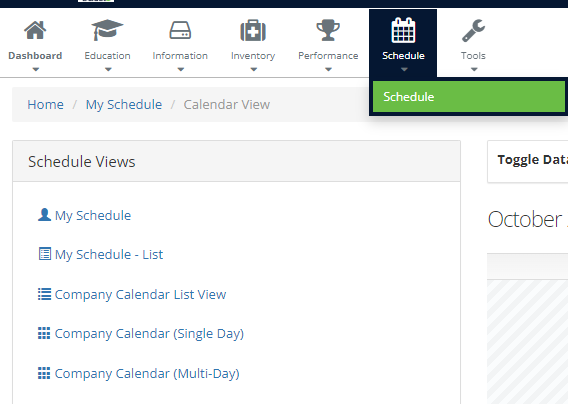
- My Schedule: This is the default calendar view for the logged in employee's schedule
- My Schedule - List: Is the logged in employee's schedule in a list type view
- Company Calendar - List: The entire company's schedule in a list type view
- Company Calendar (Single Day): The entire company's schedule in single day view
- Company Calendar - Calendar: The entire company's schedule in calendar format
Additional Information
- If all shifts are not populating within the company schedule view ensure all shifts are being displayed in the filter.
- If you are unable to view either company schedule it is due to your Agency not allowing access to it.