The Classroom (ILE) Training Cloud allows you to view, edit, and manage venues associated with your classroom training sessions.
Navigation Path
Admin > Classroom (ILE) Training Cloud > Venues > Existing
Instructions
Step 1: Log into VAIRKKO
Log into the VAIRKKO platform using your credentials.
Step 2: Access the Admin Area
Click “ADMIN” in the upper right-hand corner of the screen.
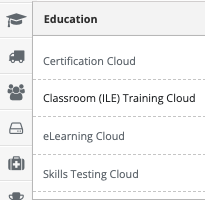
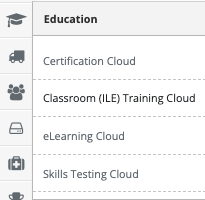
Step 3: Open Classroom (ILE) Training Cloud
From the administrative toolbar, select Classroom (ILE) Training Cloud.
Step 4: Navigate to Venues
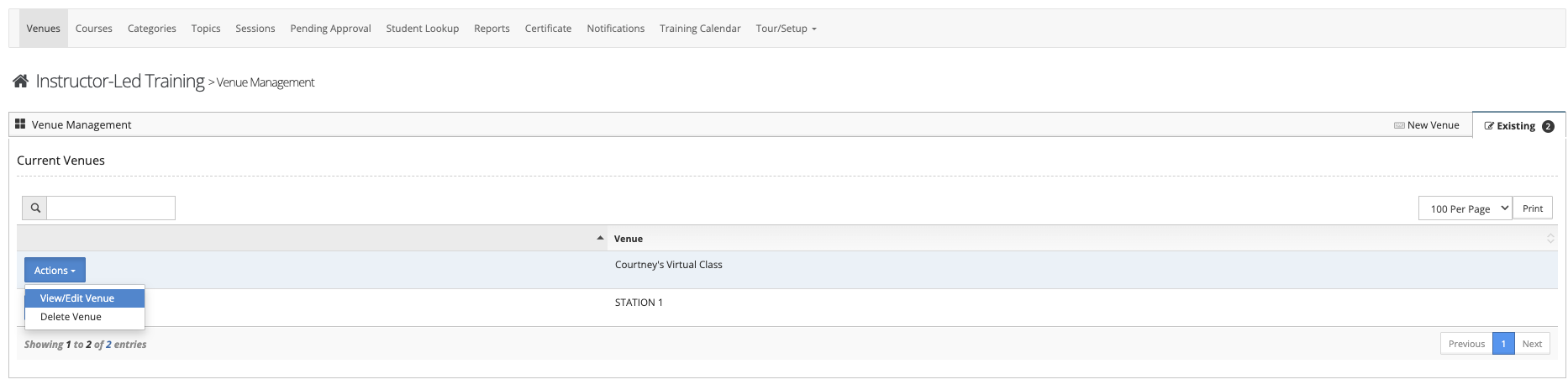
Select “Venues” from the in-app menu.
Step 5: View Existing Venues
Click the “Existing” tab to view all previously created venues.
Step 6: Manage Venue Settings
Click the “Actions” button next to the venue you wish to manage. From here, you can:
- Edit venue details
- Delete the venue
Notes
- Changes to a venue may impact associated training sessions.
- Ensure all venue details remain accurate for scheduling and communication purposes.