This guide outlines how to configure which users will receive notifications when an employee uploads an outside training class within the VAIRKKO platform.
Navigation Path
Admin > Classroom (ILE) Training Cloud > Notifications
Instructions
Step 1: Log into VAIRKKO
Log into the VAIRKKO platform using your credentials.
Step 2: Access the Admin Area
Click “ADMIN” in the upper right-hand corner of the screen.
Step 3: Open Classroom (ILE) Training Cloud
From the administrative toolbar, select Classroom (ILE) Training Cloud.
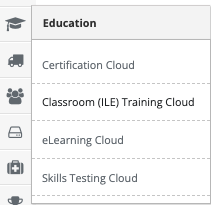
Step 4: Navigate to Notifications
Click “Notifications” from the in-app menu.
Step 5: Select Notification Group(s)
Enter or select the group(s) that should receive notifications when an outside training class is uploaded.
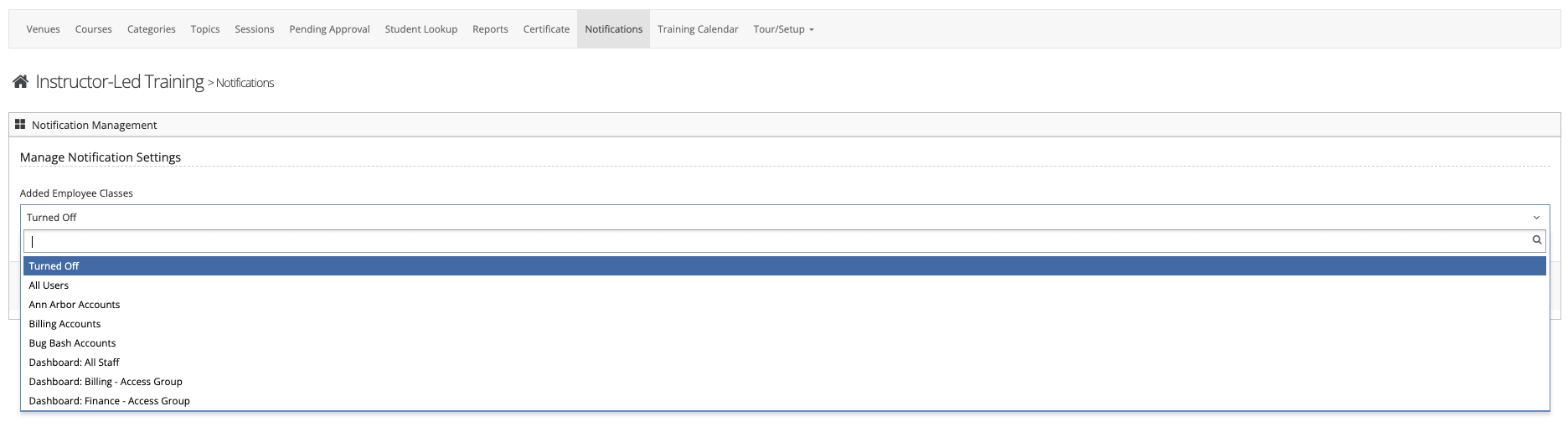
Step 6: Save Changes
Click Save to apply your changes.
Notes
- Only users within the selected group(s) will receive notifications.
- Ensure the appropriate supervisors or administrators are included.
- Changes take effect immediately after saving.
Additional Information
If notifications are not being received:
- Verify users are assigned to the correct group(s)
- Confirm email notifications are enabled for those users
- Check spam or junk folders
Was this article helpful?
That’s Great!
Thank you for your feedback
Sorry! We couldn't be helpful
Thank you for your feedback
Feedback sent
We appreciate your effort and will try to fix the article