You can create an unlimited number of courses within the Classroom (ILE) Training Cloud. Follow the steps below to create a new course.
Navigation Path
Admin > Classroom (ILE) Training Cloud > Courses
Instructions
Step 1: Log into VAIRKKO
Log into the VAIRKKO platform using your credentials.
Step 2: Access the Admin Area
Click “ADMIN” in the upper right-hand corner of the screen.
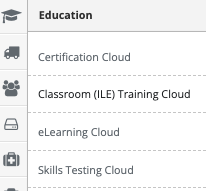
Step 3: Open Classroom (ILE) Training Cloud
From the administrative toolbar, select Classroom (ILE) Training Cloud.
Step 4: Navigate to Courses
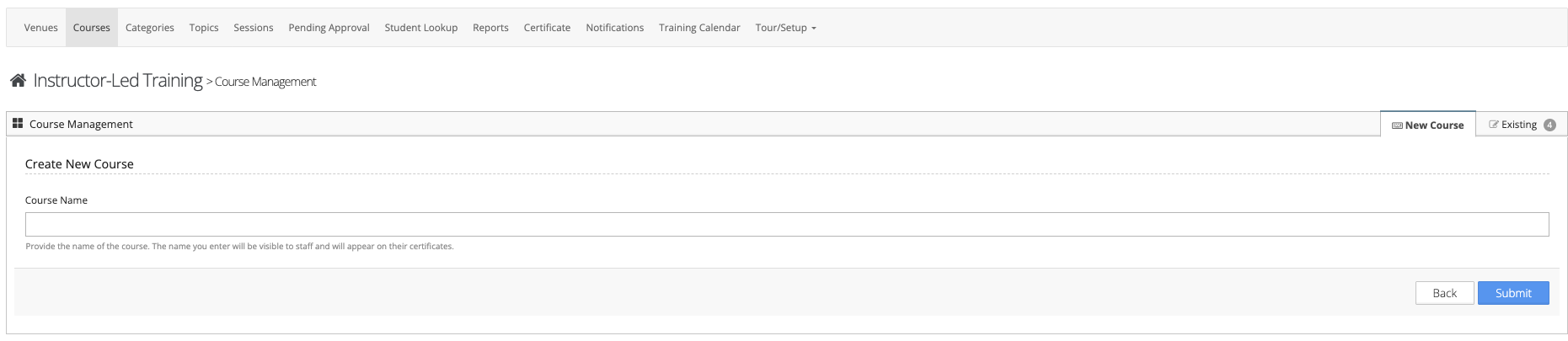
Select “Courses” from the in-app menu.
Step 5: Create a New Course
Click the “New Course” tab to begin creating a new course.
Step 6: Enter Course Details
Enter the name of the course you are creating.
Step 7: Complete Course Setup
Follow the on-screen prompts to complete the course setup.
Step 8: Save Changes
Click Save to finalize and create the course.
Additional Information
- You can create a generic course such as “Monthly Training” and use the Topics feature to outline the content covered each month.
- A custom confirmation email can be configured and sent to all registrants.
- You can designate an employee to be copied on all confirmation emails for the course.
Was this article helpful?
That’s Great!
Thank you for your feedback
Sorry! We couldn't be helpful
Thank you for your feedback
Feedback sent
We appreciate your effort and will try to fix the article