The ECP tab gives you one place where you can view pertinent information. To view, the ECP follow the steps below.
Step 1: Log into the VAIRKKO Platform
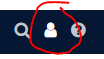
Step 2: Select the 'Person' icon in the upper right-hand corner
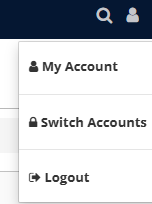
Step 3: Select 'My Account'
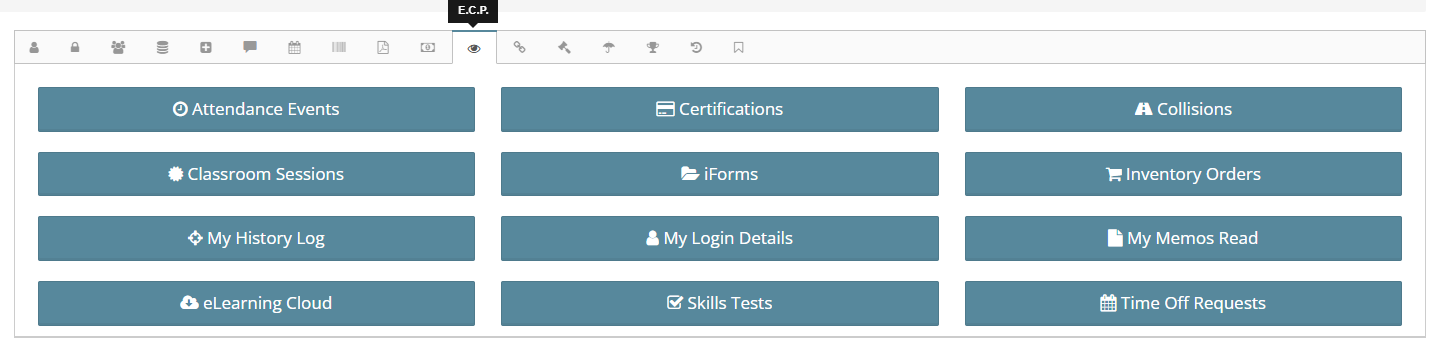
Step 4: Select the 'E.C.P' tab
Additional Information
- Attendance Events - Displays attendance events that have been entered relating to you
- Certifications - Shows all your current certifications
- Collisions - Shows any vehicle collisions you are linked to
- Classroom Sessions - Shows any classroom training you have attended
- iForms - Displays the iForms you have submitted
- Inventory Orders - Shows your last inventory orders submitted
- My History Log - Your individual history in the platform
- My Login Details - Displays when you logged into the platform
- My Memos Read - Shows the memos you have read
- Online Training - Shows your online training taken
- Skills Test - Shows your completed skills test
- Time Off Request - Your submitted time off request