The points of contact in the VAIRKKO platform are used to select specific members that receive information on the VAIRKKO Platform.
Step 1: Log into the VAIRKKO Platform
Step 2: Access the Administrative area by clicking 'ADMIN' in the upper right-hand corner.
Step 3: Access the 'General Setup' from the Administrative Toolbar
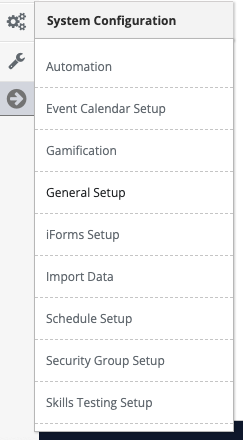
Step 4: Select 'Points of Contact' from the in-app menu.
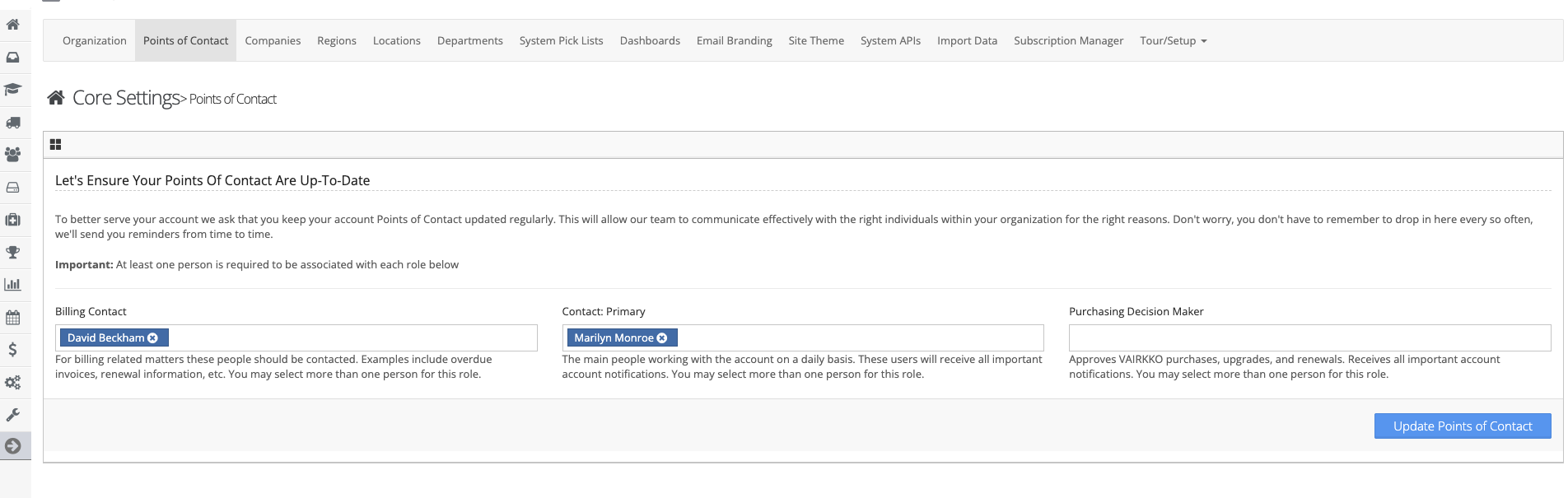
Step 5: Enter your Points of Contact
MPORTANT NOTE: If no Points of Contact are set see below for who will receive notifications:
- Billing Contact: If no Billing Contact is set then any employee that has administrative access to one or more products will receive Billing information.
- Contact Primary: If no Contact: Primary is set then any employee that has administrative access to one or more products will receive information pertaining to items such as system updates, new features, promotional items, etc
Was this article helpful?
That’s Great!
Thank you for your feedback
Sorry! We couldn't be helpful
Thank you for your feedback
Feedback sent
We appreciate your effort and will try to fix the article