The VAIRKKO platform allows you to publish your Classroom Training calendar to your agency’s website. This enables both employees and non-employees to view available sessions and register directly from your site.
Navigation Path
Admin > General Setup > System API’s
Instructions
Step 1: Log into VAIRKKO
Log into the VAIRKKO platform using your credentials.
Step 2: Access the Admin Area
Click “ADMIN” in the upper right-hand corner of the screen.
Step 3: Open General Setup
From the administrative toolbar, select General Setup.
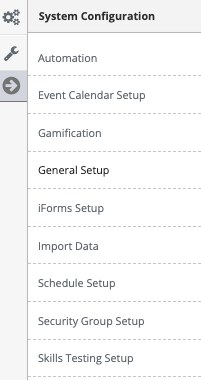
Step 4: Navigate to System API’s
Select “System API’s” from the in-app menu.
Step 5: Copy the Code Snippet
Locate the code snippet under Instructor Led Education (EEM) and copy it.
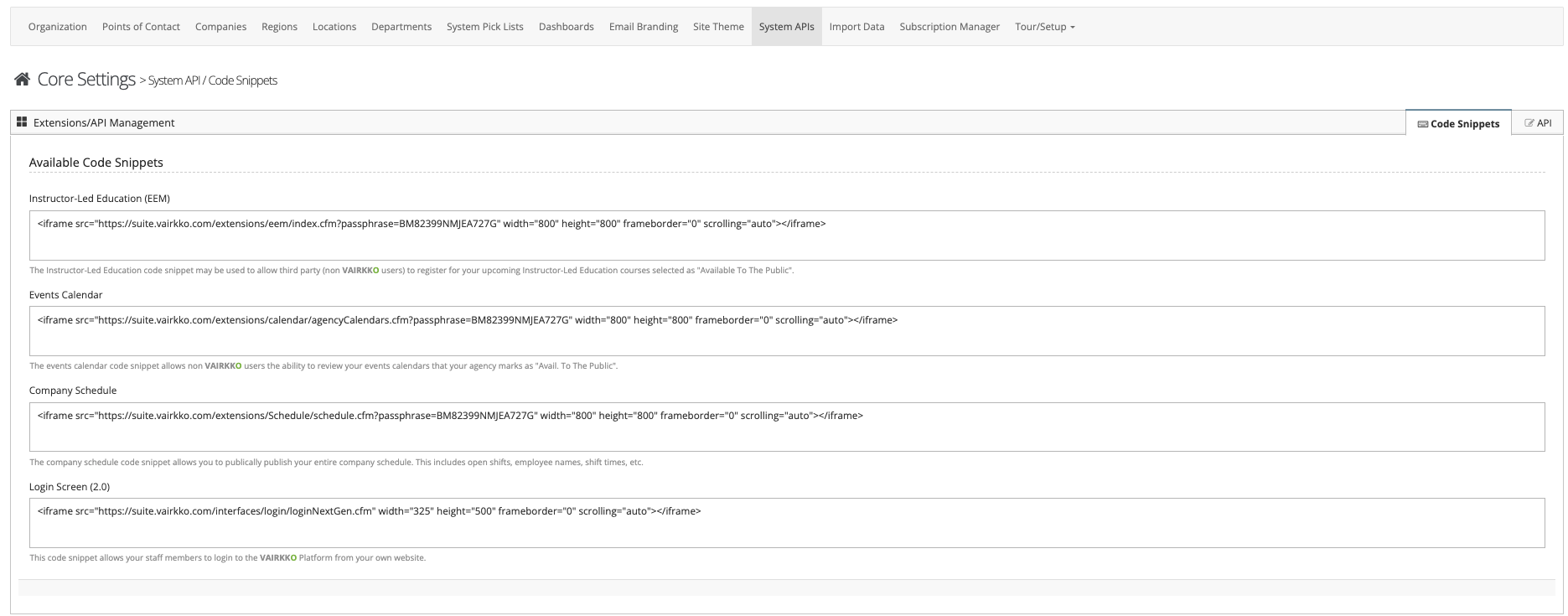
Step 6: Provide Code to Web Developer
Provide the copied code snippet to your web developer to embed on your agency’s website.
Notes
- This integration allows users to view and register for training sessions directly from your website.
- Any updates made in VAIRKKO will reflect on the published calendar.
- Ensure your web developer places the code in the correct location on your website for proper display.
Was this article helpful?
That’s Great!
Thank you for your feedback
Sorry! We couldn't be helpful
Thank you for your feedback
Feedback sent
We appreciate your effort and will try to fix the article